


Key takeaways
- Custom cloud solutions solve business problems when standard platforms can’t fit your workflows, integrations, compliance evidence needs, or scaling patterns.
- For regulated or complex workloads, you can design security controls and audit trails around what your team must prove.
- Outer Edge Technology cloud solutions can design, build, validate, and run the cloud ecosystem so your team gets results without carrying the operational burden alone.
What business problems are solved by custom cloud solutions?
Custom cloud solutions usually make sense when a business has real constraints that off-the-shelf software cannot bend around, without creating workarounds, manual steps, or risk. That is why most organizations end up running a mix of cloud services rather than betting everything on a single tool or model.
For example, Netflix has used AWS to support parts of its production and visual effects workflows, which involve heavy compute, storage, and distributed collaboration.
1. Your workflows are specific, and “standard” tools force compromises
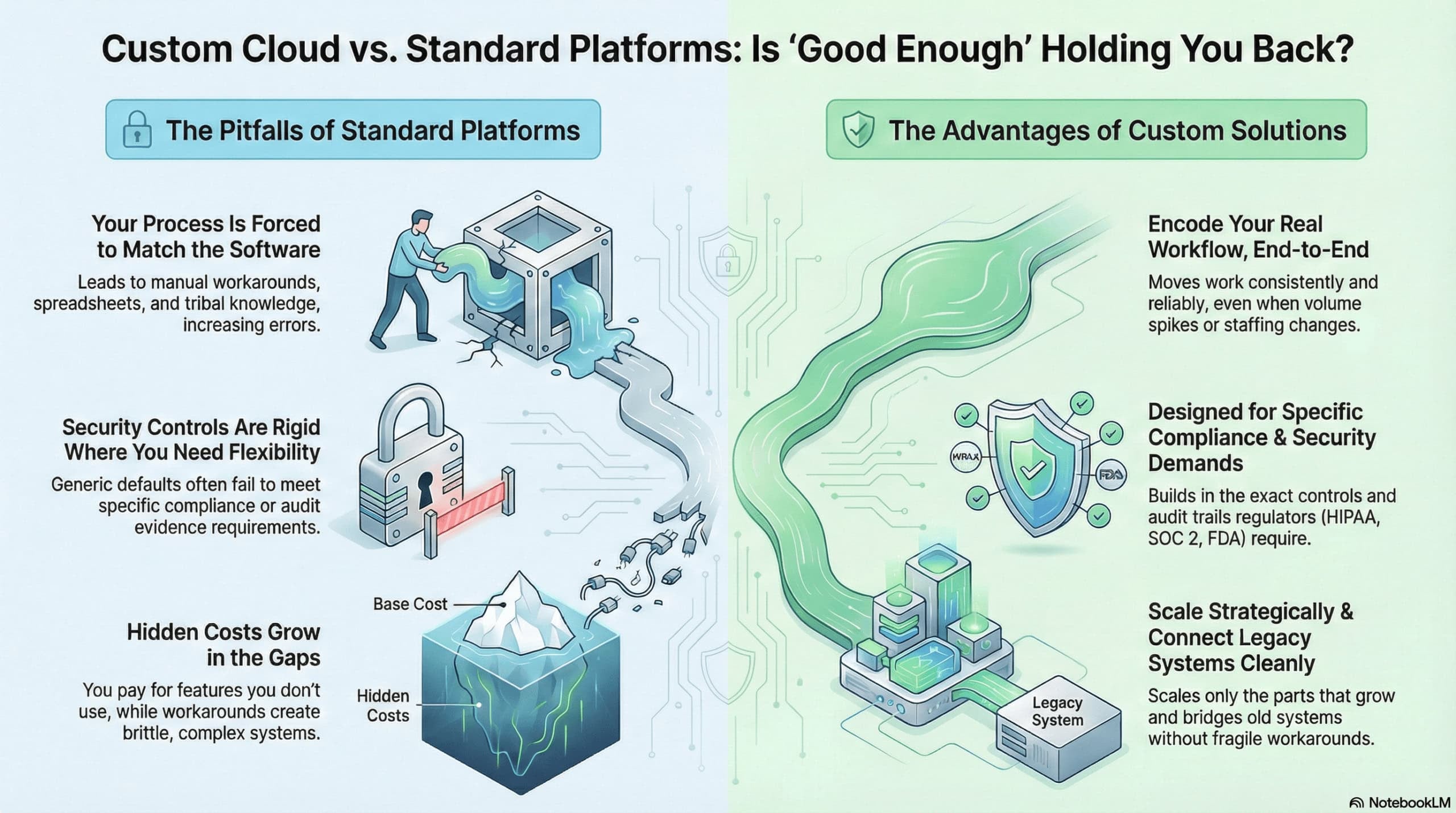
If your process includes approvals, exceptions, handoffs, or customer rules that do not align with a generic product, teams start patching gaps with spreadsheets, side tools, and manual checks.
A custom cloud setup can encode your real workflow end-to-end, so work moves consistently even when volume spikes or staffing changes.
2. You need scaling that matches how your business actually grows
More users are only one kind of growth. Some teams need seasonal spikes, some add locations, some expand data volume, and some add new apps that must share identity, logging, and reporting.
Custom cloud architecture can scale the right layer (compute, database, storage, or network) without overbuying the others.
3. Legacy systems have to connect cleanly (without fragile workarounds)
Many businesses still run older ERPs, on-prem databases, or specialty software that cannot be replaced quickly.
Custom cloud solutions can bridge the old and the new with controlled integrations, data pipelines, and secure connectivity, so modernization happens in steps rather than in a single risky cutover.
4. Compliance and security requirements demand specific controls and evidence
Regulated teams often need clear ownership of logs, access control, encryption choices, retention, backup testing, change control, and audit evidence. Custom configurations allow you to meet those requirements deliberately, instead of hoping a generic tool’s defaults line up with your policies.
5. You need differentiation, not the same setup your competitors have
If everyone in your industry runs the same SaaS stack the same way, you compete on price and speed alone. Custom cloud work lets you build unique capabilities: faster customer onboarding, smarter routing, better analytics, or more resilient operations.
Limitations of standard cloud platforms when compared with custom cloud solutions
Standard cloud platforms are designed to serve the widest range of customers. That’s great when your needs are common. It becomes frustrating when your business runs on exceptions, approvals, and industry rules that do not fit neatly into a default product.
One-size-fits-most features rarely match your real workflow
Most platforms give you configurable options, but only within the boundaries they designed. If your workflow depends on specific routing rules, unusual approval chains, location-based permissions, or multi-entity reporting, you end up stitching together workarounds.
Those workarounds tend to live in spreadsheets, email threads, and “tribal knowledge,” which increases mistakes and slows teams down.
Security settings can be rigid right where you need flexibility
Many platforms offer solid security fundamentals, but regulated environments often need more:
- Custom logging requirements
- Tighter segmentation
- specific retention rules
- Controlled encryption key handling
- Stricter admin separation
- Evidence-friendly change controls
- Air-gapped/ Dedicated Environments
When a vendor’s settings do not align with your required controls, you either accept risk or bolt on extra tools to compensate.
You get pushed to change your process to match the software
This is where operational friction shows up. Teams start renaming steps to fit the tool, skipping checks because the system makes them annoying, or creating parallel processes outside the platform.
On paper, you implemented the tool. In reality, you created two systems: the official one and the one people actually use.
You pay for features you do not need, and cannot remove
Standard platforms' price for broad usage, bundles, tiers, and add-ons. It is common to pay for capabilities your team never touches, while the one capability you truly need sits behind a higher tier.
Over time, you also pay in a less visible way: training time, manual effort, and integration work that only exists because the platform cannot be shaped to your exact needs.
The hidden cost: complexity grows in the gaps
Individually, each workaround seems small. Collectively, they create the why is this so hard? experience: inconsistent data, brittle integrations, unclear ownership, and slow incident response when something breaks.
Custom cloud solutions tend to reduce these gaps by building around your operating reality. This includes workflows, integrations, access rules, and compliance evidence to keep the system coherent as you scale.
How custom cloud solutions support complex or regulated workloads
Custom cloud solutions help by designing the environment around those proof points from the start, so compliance and reliability are built into daily operations. Here are some advantages of a custom cloud solution and how it supports you.
Built to meet specific compliance requirements (HIPAA, SOC 2, FDA)
Custom cloud solutions are designed around the controls you’ll be asked to show, who accessed what, when changes happened, how data is protected, and how systems recover. For healthcare workloads that involve ePHI, that often starts with putting the right contracts and guardrails in place.
For example, using a HIPAA Business Associate Agreement with your cloud provider, then scoping workloads to the covered services.
Handle sensitive data with custom security and access controls
Standard defaults are rarely enough when you have real-world roles (billing, clinicians, support, contractors) and real-world risk (phishing, credential sharing, vendor access).
A custom setup typically tightens identity and access controls (least privilege, MFA, separation of duties), strengthens segmentation, and forces stronger logging to enable investigations.
These security design choices also align naturally with how SOC 2 programs are evaluated using the Trust Services Criteria (security, availability, confidentiality, etc.).
Scale the parts that grow, without overbuilding everything else
A growing business rarely needs everything bigger. It usually needs one or two pressure points to scale, customer logins during peak hours, a data pipeline at month-end, or a reporting system during audits.
Custom cloud architecture lets you isolate and scale only the components you need (for example, autoscaling an API layer while keeping back-office systems stable), helping keep costs predictable and performance stable.
Create audit trails and reports designed for your regulators
For FDA-regulated electronic records, audit trails are a common expectation, and Part 11 explicitly calls for secure, computer-generated, time-stamped audit trails for certain record changes.
Custom cloud implementations often include purpose-built audit logging, retention rules, change-control records, and review-ready exports, so compliance teams don’t have to stitch proof together at the last minute.
FDA’s newer Computer Software Assurance (CSA) approach also reinforces that software assurance should be risk-based and documented to match patient/product impact.
Factors to consider when choosing custom cloud solutions
When you choose a custom cloud solution, you’re usually trying to solve an operations problem: you need the cloud to fit your business, not force your business to fit the cloud.
1. Total cost that stays true after go-live
Custom builds can look expensive up front, but the real cost is the full lifecycle: build + security work + monitoring + incident response + documentation + future changes. The best way to sanity-check cost is to ask: “What will this cost us to run and prove every month?”
Financial institutions often prioritize resilience and automation because outages and weak controls are expensive. Capital One has published how it improved resilience using AWS with automated approaches.
2. Time to launch vs. time to trust
A fast launch is only a win if the environment is stable, secure, and supportable. Custom solutions are worth it when you must get the architecture right (networking, segmentation, identity, logging) and can’t bolt those on later without pain.
A practical framing: “How fast can we go live without creating rework in 90 days?”
3. In-house skills required to run it day-to-day
Someone has to own patching posture, access reviews, monitoring, backup/restore testing, and change control. If your team is lean, you may still do custom, but you’ll want a partner who can own operations with you, not hand you a diagram and disappear.
4. Vendor experience in your industry and regulations
Regulated work is where custom becomes common because evidence matters. You’re not only building systems; you’re building proof.
- Healthcare. HIPAA Security Rule requirements map to administrative, physical, and technical safeguards. Your cloud design needs to support access control, audit controls, and security processes that you can show on demand.
- Life sciences / FDA-regulated records. If you deal with electronic records/signatures, expectations such as secure, computer-generated audit trails are explicitly set out in 21 CFR Part 11.
5. Flexibility to change as the business changes
Custom is most valuable when you expect change: acquisitions, new locations, new products, new data types, new audits. The question to ask isn’t “Can it scale?” but “Can we change one part without breaking five others?”
A good custom approach isolates risk: identity, networking, logging, and workloads are modular, so growth doesn’t turn into a rewrite.
Outer Edge is the go-to partner for custom cloud solutions
When standard public cloud setups fall short for regulated data, legacy integrations, validation needs, or strict uptime targets, Outer Edge acts as a partner that owns the outcome. Public cloud providers like AWS and Azure require selecting fixed compute instance sizes, which cannot be adjusted without migrating to a new instance.
Outer Edge designs and manages secure, validation-ready environments across private, on-premise, AWS, and Azure, with the ability to deliver custom configurations upfront and adjust resources on the fly as needs change.
- Built for regulated industries, with experience supporting SOC 2 Type II, ITAR-ready, HIPAA, and FDA validation requirements.
- Core support areas: infrastructure management, business continuity (rapid recovery and verified failover), and network solutions with SOC 2-aligned controls.
If you need compliant, audit-ready infrastructure without burdening your internal team, request Outer Edge’s infrastructure and compliance consultation.
FAQs
When should I consider a custom cloud solution instead of a standard platform?
Choose custom when you have regulated workloads, strict uptime needs, complex integrations, or legacy systems that don’t fit cleanly into off-the-shelf cloud configurations.
What does Outer Edge typically handle versus what my team owns?
Outer Edge can own the end-to-end build and operations, requirements alignment, design, deployment, validation/UAT support, documentation, and ongoing management. This way, your team focuses on business decisions, application ownership, and internal approvals.
How do I get started with Outer Edge if I’m not sure which cloud model or setup I need?
Start with our consultation: bring your goals (uptime, security, compliance, integrations), current constraints, and any audit requirements, and they’ll map next steps, scope, and a practical path forward.
Why do generic cloud solutions fail?
Generic cloud solutions fail when your workflows, integrations, or compliance requirements don’t align with the platform’s predefined rules. Hence, teams end up patching gaps with manual workarounds and brittle add-ons.